![Foxo-logo.png]](https://help.foxo.com/hs-fs/hubfs/Foxo-logo.png?height=40&name=Foxo-logo.png)
💡 Good to know...
- Foxo Messages are secure and compliant. 🔒
- Share files, documents, images or Patient Cards 📁
- Start or join a voice or video call with screen-sharing 📞
- Group Messages allow multidisciplinary teams to collaborate beyond their Organisation while securely sharing patient information. 👥
Sending a Foxo Message:
1️⃣ Click the + icon next to the Messages menu item (left).
2️⃣ Select one or more contacts from the list.
3️⃣ Click on the blue tick icon.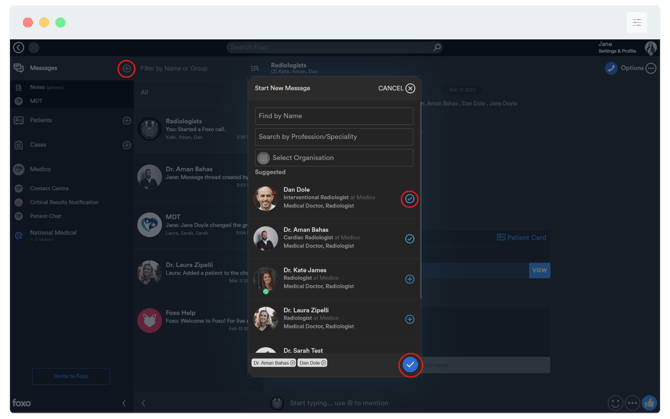
4️⃣ Start chatting or start a voice or video call. Use the three dots in the bottom right to Share Media, a Patient Card or to Record Audio, or Share GIFs.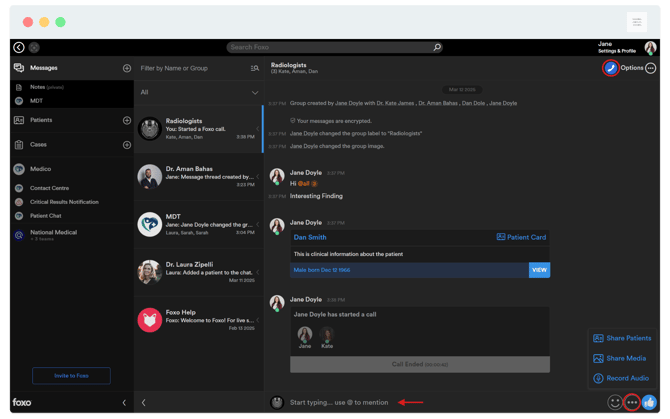
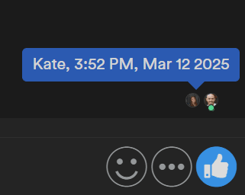
💡 Good to know: Read receipts appear as each recipient's profile image next to the last message they have read. Hover over the image to see who read your message and when.
Something not working?
- A contact is not appearing in the list — they may not have an account on the Foxo network. To send a secure message to someone outside the Foxo network, use Referrer Connect or Patient Connect.
- The + icon is not visible — try refreshing the app or switching to the Foxo desktop app. If the issue persists, contact Foxo Help.
FAQ
Can I message someone outside my Organisation? Yes. Foxo Messages support communication with any health professional on the Foxo network, regardless of their Organisation.